Home Automation Systems: A Complete Guide to Smart Homes
Home automation systems connect household devices, sensors, controls, and software so that different functions can be monitored or operated automatically.
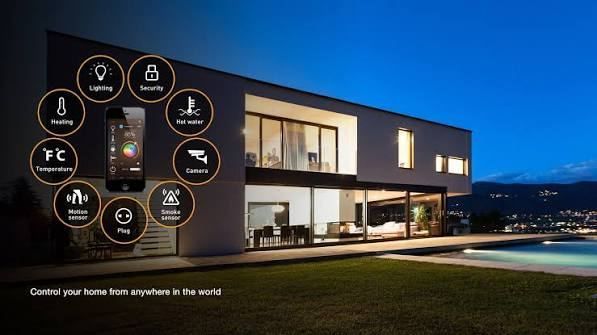
Lighting, heating and cooling, security, appliances, entertainment equipment, curtains, and energy-related devices can all be integrated into a connected home environment.
Automation can range from simple scheduled lighting to more advanced systems that use sensors and programmed rules to respond to changing conditions. Understanding the main components, communication technologies, applications, and control methods helps homeowners plan a suitable smart home setup.
What Are Home Automation Systems?
Home automation systems are technologies that allow household devices and systems to communicate and operate according to user commands, schedules, sensor inputs, or predefined rules.
A basic system may control one category, such as lighting. A more integrated system can connect multiple functions through a central controller or software platform.
Common elements include:
- Sensors
- Smart switches
- Controllers
- Connected appliances
- Security devices
- Lighting systems
- Climate controls
- Communication networks
- Mobile or voice interfaces
The level of automation depends on the equipment installed and how different devices are configured to interact.
How Home Automation Systems Work
A typical home automation system follows a sequence involving sensing, communication, decision-making, and control.
1. Sensors Collect Information
Sensors detect conditions within or around the home. Motion sensors can detect movement, temperature sensors can measure environmental conditions, and door or window sensors can identify changes in position.
2. Devices Send Data
Connected devices communicate information through a wired or wireless network. Depending on the system, communication may use Wi-Fi, Bluetooth, Zigbee, Z-Wave, Thread, Ethernet, or other technologies.
3. Controller Processes Information
A hub, gateway, local controller, or cloud-based platform can process information received from connected devices.
The controller applies predefined rules. For example, a motion sensor may trigger a lighting command when movement is detected in a particular area.
4. Automated Action Takes Place
The system sends a command to the relevant device. A smart light may switch on, a thermostat may adjust a temperature setting, or a motorized curtain may change position.
5. Users Monitor and Adjust Settings
Users can interact with the system through a smartphone application, touchscreen panel, computer interface, voice assistant, or physical control.
Main Types of Home Automation Systems
Lighting Automation
Smart lighting systems can control individual lights, groups of lights, or entire rooms.
Users can create schedules, adjust brightness, and configure lighting based on occupancy or time of day.
Climate Automation
Smart thermostats, temperature sensors, ventilation controls, and connected HVAC equipment can work together to regulate indoor conditions.
Automation rules can be based on temperature, occupancy, schedules, or other predefined settings.
Home Security Automation
Security automation can integrate cameras, motion sensors, door sensors, locks, alarms, and video doorbells.
A connected system can provide notifications when specific events occur, such as movement detection or an opened door.
Appliance Automation
Connected appliances can be monitored and controlled through compatible platforms. Examples include washing machines, ovens, refrigerators, and robotic cleaning equipment.
The available functions depend on the appliance and its communication technology.
Entertainment Automation
Home automation can connect televisions, speakers, streaming equipment, projectors, and other entertainment devices.
A centralized interface can simplify control of multiple devices.
Motorized Window and Curtain Automation
Motorized blinds, shades, and curtains can be programmed according to schedules, sunlight conditions, or user commands.
Comparison of Home Automation Applications
| Application | Common Devices | Typical Control Method |
|---|---|---|
| Lighting | Smart bulbs, switches, dimmers | App, sensor, schedule |
| Climate | Thermostats, sensors, HVAC controls | App, sensor, schedule |
| Security | Cameras, locks, alarms | App, sensors, alerts |
| Appliances | Connected household appliances | App, schedule, automation rules |
| Entertainment | TVs, speakers, projectors | App, voice, remote |
| Curtains | Motorized blinds and shades | App, schedule, sensors |
| Energy monitoring | Smart meters, energy sensors | App, dashboard |
Key Components of a Home Automation System
Smart Sensors
Sensors provide information about conditions in the home. Common examples include motion, temperature, humidity, light, smoke, water-leak, and door-position sensors.
Smart Actuators
Actuators perform physical actions based on commands. Examples include smart switches, motorized valves, electronic locks, and curtain motors.
Central Controller
A controller coordinates connected devices and automation rules. Some systems use a dedicated hub, while others distribute control between devices and software platforms.
Communication Network
The network allows devices to exchange information. Wired Ethernet and wireless technologies can both be used depending on the installation.
User Interface
Mobile applications, wall-mounted panels, voice interfaces, and web dashboards can provide users with control over connected equipment.
Smart Devices
Smart lights, thermostats, appliances, cameras, speakers, locks, and other connected products form the operational layer of the system.
Wired and Wireless Home Automation
Home automation can use either wired connections, wireless communication, or a combination of both.
| Feature | Wired Systems | Wireless Systems |
|---|---|---|
| Connection | Physical cables | Radio communication |
| Installation | Often planned during construction | Can suit existing homes |
| Network dependency | Depends on system design | Wireless coverage is important |
| Reliability | Can provide stable physical links | Can be affected by interference |
| Expansion | May require additional wiring | Often easier to add compatible devices |
| Typical applications | Integrated building systems | Retrofitted smart devices |
The appropriate approach depends on the building structure, installation stage, network environment, and number of devices.
Communication Technologies
Wi-Fi
Wi-Fi can connect smart appliances, cameras, speakers, switches, and other devices to a home network. It is widely available but devices can increase network traffic as the number of connected products grows.
Bluetooth
Bluetooth is commonly used for short-range communication and device configuration. Its range and network capabilities differ from technologies designed specifically for larger automation networks.
Zigbee
Zigbee is a low-power wireless technology that can support networks of compatible smart home devices. Many implementations use mesh networking to extend communication between devices.
Z-Wave
Z-Wave is another wireless technology designed for home automation applications. It supports communication between compatible devices through a mesh network.
Thread
Thread is a low-power mesh networking technology designed for connected devices. It can form part of modern smart home architectures and can work with compatible application-layer technologies.
Ethernet
Ethernet provides a wired network connection and can be useful for equipment that requires a stable network link, such as certain controllers, access points, and cameras.
Benefits of Home Automation
Convenience
Users can control multiple household functions from a centralized interface rather than operating each device separately.
Scheduling
Lights, thermostats, appliances, and other devices can operate according to programmed schedules.
Monitoring
Connected sensors and devices can provide information about household conditions and equipment status.
Energy Management
Automation can help users monitor energy-related activity and create rules around lighting, heating, cooling, and other equipment.
Accessibility
Automated controls can reduce the need for repeated physical interaction with household equipment. Voice and app-based controls can provide additional ways to operate connected devices.
Security and Privacy Considerations
Connected home devices communicate through networks and may process household information. Security should therefore be considered when designing an automation system.
Users should keep device firmware and applications updated, use strong and unique passwords, enable multi-factor authentication when available, and secure the home network.
It is also useful to review device permissions and understand what information individual products collect or transmit. Cameras, microphones, locks, and other sensitive devices require particular attention to access controls.
Home Automation Installation Planning
Before installing a system, homeowners should identify the functions they want to automate.
A practical planning process includes:
- List the devices and systems to be controlled.
- Identify required sensors and control points.
- Determine whether wired or wireless communication is appropriate.
- Check device compatibility.
- Select the required control platform.
- Plan network coverage and electrical requirements.
- Configure automation rules.
- Test individual devices and complete routines.
Compatibility is particularly important because products using different communication standards or software ecosystems may not provide the same level of integration.
Maintenance Requirements
Home automation systems require periodic maintenance even though many functions are automated.
Firmware and application updates should be applied according to manufacturer instructions. Batteries in wireless sensors should be checked periodically, while wired equipment should be inspected for physical damage or connection problems.
Network performance should also be monitored when a large number of connected devices are installed. Automation rules should be reviewed when household routines change.
Frequently Asked Questions
What is a home automation system?
A home automation system connects household devices and controls so they can be operated through user commands, schedules, sensors, or programmed rules.
What devices can be automated?
Common examples include lights, thermostats, cameras, locks, appliances, curtains, entertainment equipment, irrigation controls, and selected HVAC systems.
Does home automation require Wi-Fi?
Not always. Some systems use Ethernet, Zigbee, Z-Wave, Thread, Bluetooth, or other communication technologies. Some installations combine several network technologies.
Can home automation be added to an existing house?
Yes. Wireless devices and retrofit-compatible equipment can allow automation to be added without extensive structural changes. The available options depend on the home's electrical, network, and device environment.
Is home automation secure?
Security depends on the devices, network configuration, software, access controls, and maintenance practices. Strong credentials, current firmware, secure networks, and appropriate permissions can reduce common security risks.
Conclusion
Home automation systems bring together sensors, connected devices, controllers, communication networks, and software to automate household functions. Lighting, climate control, security, appliances, entertainment, and window systems can all be integrated according to the requirements of a home.
Different technologies support different installation approaches. Wired systems can form part of integrated building infrastructure, while wireless technologies can simplify the addition of compatible devices to existing homes.
A well-planned system should consider device compatibility, network architecture, security, maintenance, and the specific functions that need to be automated. Starting with clearly defined requirements can help create a connected home environment that is easier to monitor and control.